
Vertical Video Reformatting: A Creator's 2026 Guide
Vertical video reformatting is the AI-powered process of converting horizontal 16:9 footage into a 9:16 portrait format by dynamically cropping and repositioning key subjects frame by frame. Unlike a simple center crop, modern reformatting uses subject detection to follow faces, speakers, and action across the frame. Platforms like TikTok, Instagram Reels, and YouTube Shorts demand this format natively, and creators who reformat well see measurably better engagement than those who letterbox or static-crop their content. This guide covers the full picture: how the technology works, when to use it, and how to get the most out of every reformat.
What is vertical video reformatting, exactly?
Vertical video reformatting converts 16:9 horizontal videos into a 9:16 vertical format by resizing and cropping to keep key subjects visible, with the standard output being 1080×1920 resolution optimized for mobile screens. The industry term for the underlying technique is auto-reframe or smart reframe, and that distinction matters. "Reformatting" describes the goal; "auto-reframe" describes the method. Both terms appear throughout professional workflows, and understanding both helps you evaluate tools and communicate with editors.
The core problem reformatting solves is straightforward. A horizontal video shot for YouTube or broadcast fills only a fraction of a vertical phone screen. Letterboxing wastes real estate and signals to the algorithm that the content was not made for the platform. Reformatting fills the entire screen, which is why vertical-first platforms like TikTok and Instagram Reels prioritize portrait videos to maximize engagement and screen real estate.
The technology sits at the intersection of computer vision and video editing. AI models analyze every frame, identify the primary subject, and reposition a virtual crop window to keep that subject centered and visible. The result feels like a human camera operator made deliberate framing choices, not like a machine sliced off the sides of your footage.

How does vertical video reformatting work technically?
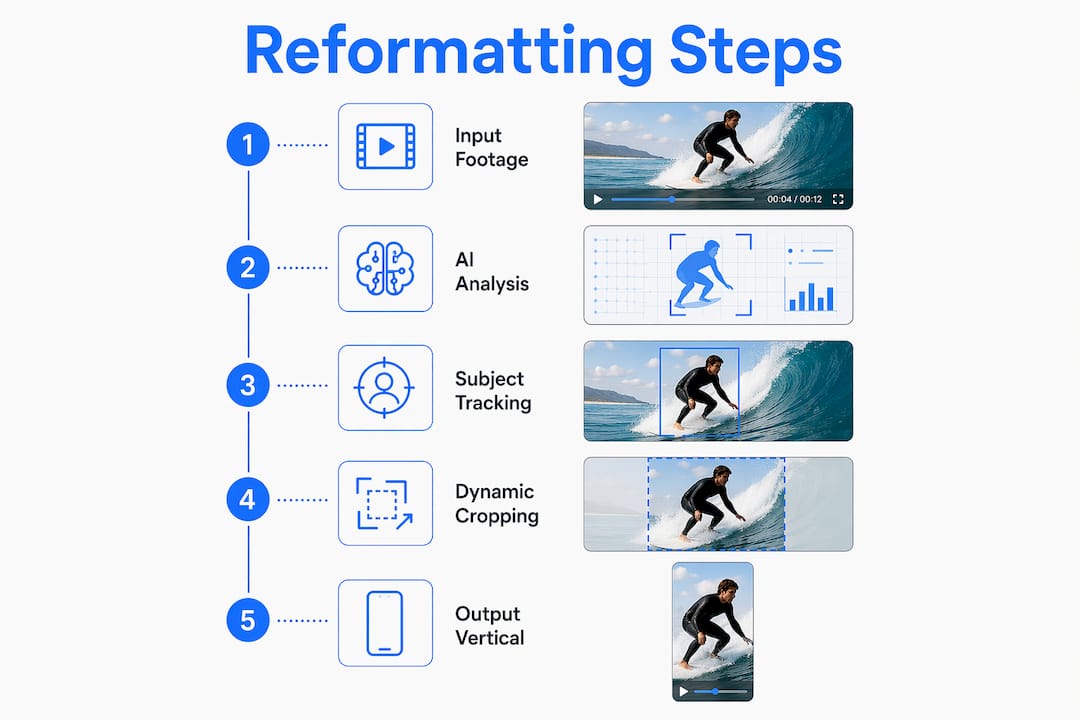
The process breaks down into four distinct stages, each building on the last.
-
Subject detection. The AI scans each frame for primary subjects, typically faces, speakers, or the dominant moving object. AI-assisted reformatting detects and tracks main subjects like faces or speakers, dynamically repositioning the crop window frame by frame, which prevents fixed center crops from cutting off moving subjects.
-
Crop window positioning. Once the subject is identified, the system calculates the optimal center point for the 9:16 crop window. This is not a static calculation. The window moves continuously as the subject moves, keeping them in the frame even during fast lateral motion or scene changes.
-
Smoothing and interpolation. Raw tracking data is noisy. If the crop window jumped to every micro-movement, the output would feel jittery and unwatchable. Advanced systems compute crop centers per frame and apply smoothing and interpolation to avoid jitter from momentary tracking errors. This is what separates professional-grade tools from basic crop filters.
-
Scene transition handling. Center-cropping works briefly but fails during scene transitions, which is why best-practice systems use per-scene or continuous subject tracking for crop paths. When a cut occurs, the AI resets its tracking anchor to the new scene's primary subject rather than continuing the previous crop path.
The difference between simple cropping and true auto-reframe is the difference between cutting a photo and hiring a cinematographer. Simple cropping takes a fixed slice of the frame. Auto-reframe builds a dynamic crop path that follows the story.
Pro Tip: When evaluating auto-reframe tools, export a 30-second clip with fast lateral movement and check whether the crop window moves smoothly or jumps. Jitter in that test reveals weak interpolation, which will compound across a longer video.
What are the key benefits of vertical video reformatting?
Reformatting delivers four concrete advantages for creators and marketers working across multiple platforms.
-
Full-screen immersion. A 9:16 video fills the entire mobile screen, removing all visual competition. Viewers are not distracted by black bars or competing UI elements outside the video frame. This alone increases watch time on short-form platforms.
-
Subject clarity. Smart reframe uses a virtual camera operator style, continually recentering the crop to follow moving action. This keeps speakers' faces, product demonstrations, and on-screen text readable without manual keyframing.
-
Workflow efficiency. AI reframe tools dramatically speed up editing by automatically detecting subjects and adjusting crops, eliminating manual frame-by-frame edits and producing native-feeling vertical clips without extensive human intervention. For a team publishing daily content across TikTok, Instagram Reels, and YouTube Shorts, that time saving is significant.
-
Content repurposing at scale. A single long-form horizontal video, a webinar, a product demo, or a podcast recording, can generate multiple vertical clips for different platforms without reshooting. This is the primary reason marketers adopt reformatting workflows.
"The biggest unlock for our content calendar was realizing that every horizontal video we already owned was also a library of vertical content waiting to be extracted. Reformatting turned our archive into an active asset."
The repurposing angle is particularly powerful for brands with existing video libraries. You can learn more about extracting creator videos for repurposing workflows that scale this process systematically.
How does reformatting differ from native vertical production?
This is the question most guides skip, and it is the one that most affects quality. The table below lays out the practical differences.
| Factor | Native vertical production | Vertical video reformatting |
|---|---|---|
| Framing intent | Composed for 9:16 from the start | Adapted from an existing 16:9 composition |
| Graphics and text | Designed for vertical safe zones | May require manual repositioning post-reframe |
| Subject placement | Deliberate vertical staging | Dependent on AI tracking accuracy |
| Production cost | Higher (requires vertical-first shoot) | Lower (repurposes existing footage) |
| Output quality ceiling | Higher, no cropping compromise | Limited by original horizontal composition |
Vertical production involves deliberate vertical framing and graphics, while reformatting adapts finished horizontal clips. That distinction has real consequences. A video shot with two speakers side by side in a wide horizontal frame will always produce a compromised reformat because the crop can only follow one speaker at a time. Native vertical production would have staged those speakers differently from the start.
Reformatting is the right choice when you have existing horizontal content, a tight production budget, or a need to publish quickly across platforms. Native vertical production is the right choice when you are building a campaign from scratch and the platform is TikTok or Instagram Reels. The two approaches are not competing. Most professional workflows use both, reformatting the archive and shooting natively for hero content.
What practical tips help optimize vertical video reformatting?
Getting technically correct reformats is only half the job. Getting reformats that actually perform on platform requires attention to several details that most tutorials overlook.
-
Respect safe zones. Safe-zone areas are critical in 9:16 videos to prevent platform UI elements like captions and buttons from obscuring important text or visuals. Keep critical content within the middle vertical band of the frame. TikTok's comment overlay, Instagram's action buttons, and YouTube Shorts' title bar all eat into the top and bottom of the frame.
-
Use 1080×1920 as your baseline resolution. This is the standard output resolution for TikTok, Instagram Reels, and YouTube Shorts. Exporting at lower resolutions triggers compression artifacts that platforms amplify further during their own encoding pass.
-
Preview within the actual platform interface. Safe zones depend on platform UI overlays, not just geometric center, so workflows must preview reframed videos within target platform interfaces. Upload a draft to a private TikTok or Instagram account and scrub through it before publishing. What looks clean in your editing software may be obscured by the platform's native UI.
-
Consider generative fill for wide shots. When your source footage has important subjects near the horizontal edges, cropping will lose them. Generative fill or outpainting can expand video canvases instead of cropping, with some tools using AI to add visuals to fill vertical space rather than removing horizontal edges. This technique works well for landscape footage where the horizon line matters.
-
Audit your source footage before reformatting. Videos with heavy lower-third graphics, side-by-side compositions, or text overlaid near the horizontal edges will reformat poorly regardless of AI quality. Flag these before they enter your pipeline.
Pro Tip: Run a batch test of five to ten clips before committing a full library to any auto-reframe tool. Subject tracking accuracy varies significantly between tools when handling fast cuts, multiple speakers, or low-contrast scenes.
You can also explore video clipping and live recording workflows that integrate reformatting into a broader content extraction pipeline.
Key takeaways
Vertical video reformatting produces the best results when AI subject tracking, safe-zone awareness, and source footage quality work together rather than independently.
| Point | Details |
|---|---|
| Definition is precise | Reformatting converts 16:9 to 9:16 using dynamic AI crop paths, not static center cuts. |
| AI tracking is the differentiator | Smoothing and interpolation separate professional reframe tools from basic crop filters. |
| Safe zones are non-negotiable | Platform UI overlays hide content outside the middle vertical band on TikTok, Instagram, and YouTube Shorts. |
| Reformatting vs. native production | Native vertical shooting produces a higher quality ceiling; reformatting scales existing libraries efficiently. |
| Generative fill extends options | Outpainting preserves edge content that cropping would lose, useful for wide-angle or landscape source footage. |
Where I think most creators get this wrong
I have watched a lot of teams adopt auto-reframe tools and immediately over-rely on them. The assumption is that AI handles everything, so you can feed any horizontal footage into the pipeline and get platform-ready vertical clips out. That assumption produces mediocre content at scale.
The real skill in vertical video reformatting is upstream curation. Before a single clip enters your reframe workflow, someone needs to assess whether the source footage is actually reformattable. A talking-head interview shot with the speaker centered in a wide frame? That reformats beautifully. A panel discussion with four people spread across a conference table? That is a native vertical shoot or nothing.
The other mistake I see constantly is ignoring safe zones until after publishing. Teams spend time perfecting the crop path and then lose the lower third of their video to TikTok's comment interface. Safe-zone review has to be a step in the workflow, not an afterthought.
The future I find genuinely interesting is generative fill applied to video. Right now it is slow and computationally expensive, but the trajectory is clear. Within two to three years, reformatting will not mean choosing what to crop out. It will mean choosing what to generate in. That changes the quality ceiling entirely and makes the reformatting versus native production distinction much less sharp.
The teams building for that future are the ones investing in video intelligence infrastructure now, not just buying a reframe plugin.
— Alexandre
How Tornadoapi fits into your vertical video workflow
Tornadoapi is the video extraction infrastructure that sits between platforms like TikTok, Instagram, and YouTube and your content pipeline. When you are reformatting at scale, the bottleneck is rarely the reframe tool. It is reliable, fast access to source video files across platforms with consistent format normalization. Tornadoapi handles anti-bot systems, proxy rotation, and direct cloud delivery to S3, R2, GCS, or Azure, so your reframe pipeline always has clean input to work with. With 300 TB delivered monthly and 99.998% extraction reliability, it is built for production workloads, not one-off downloads. Explore production-scale pricing tiers to see which plan fits your repurposing volume.
FAQ
What is the standard aspect ratio for vertical video?
The standard aspect ratio for vertical video is 9:16, with a resolution of 1080×1920 pixels. TikTok, Instagram Reels, and YouTube Shorts all use this format as their native display ratio.
How does AI auto-reframe differ from manual cropping?
AI auto-reframe detects and tracks subjects frame by frame, dynamically repositioning the crop window throughout the video. Manual cropping applies a fixed crop position that does not adjust for subject movement, which causes moving subjects to exit the frame.
When should you reformat vs. shoot natively in vertical?
Reformatting works well for repurposing existing horizontal content like interviews, webinars, and product demos. Native vertical shooting is preferred when building a campaign from scratch for TikTok or Instagram Reels, since it allows deliberate framing, graphics, and staging for the 9:16 format.
What are safe zones in vertical video?
Safe zones are the areas of a 9:16 frame that remain visible after platform UI elements like buttons, captions, and overlays are applied. Keeping critical text and visuals within the middle vertical band of the frame prevents platform interfaces from obscuring key content.
Can generative AI improve vertical video reformatting quality?
Yes. Generative fill tools can expand the video canvas outward rather than cropping inward, preserving content near the horizontal edges of the original footage. This technique is particularly useful for wide-angle or landscape shots where traditional cropping would remove important visual information.