
Batch Transcribe YouTube Video Libraries in 2026
Batch transcribing YouTube video libraries is defined as converting entire playlists, channels, or collections of videos into accurate, timestamped text transcripts in a single automated workflow. Modern AI-powered tools like YouTubeTranscript.dev, Speak AI, and TubeScript make this process fast and scalable, delivering up to 95% accuracy even on videos without native captions. Transcripts export in TXT, SRT, VTT, and JSON formats, making them ready for closed captioning, SEO, content repurposing, and AI training pipelines. This guide walks you through the tools, preparation steps, and workflows to batch transcribe YouTube video libraries at any scale.
What tools are best for batch transcribing YouTube video libraries?
The right tool depends on whether you need a no-code interface, API access, or deep AI features like speaker labels. Four tools cover most professional use cases.
YouTubeTranscript.dev is built specifically for bulk video transcription. You paste a playlist or channel URL, apply filters, and get transcripts in seconds across TXT, JSON, SRT, and VTT formats. It handles entire courses or channels without requiring you to process each video individually.

Speak AI goes further with speaker detection and AI summaries. It supports batch processing for multiple URLs simultaneously and adds consistent timestamps that YouTube's auto-captions routinely miss. Media professionals working with interview-heavy content will find the speaker labeling especially useful.
TubeScript takes a captions-first approach. It pulls existing captions when available and falls back to AI audio transcription when captions are missing. The free tier includes two transcripts daily, and a developer API is available for structured outputs and summaries.
OpusClip targets creators who want transcripts tied directly to clip generation. It is less focused on raw bulk export but useful when your end goal is short-form video content from a longer library.
| Tool | Batch Processing | API Access | Export Formats | Free Tier |
|---|---|---|---|---|
| YouTubeTranscript.dev | Yes, playlists and channels | Yes | TXT, JSON, SRT, VTT | Yes |
| Speak AI | Yes, multiple URLs | Yes | TXT, SRT, VTT | Limited |
| TubeScript | Yes, playlists | Yes | TXT, SRT, summaries | 2/day |
| OpusClip | Partial | Limited | SRT, VTT | Yes |
Pro Tip: If you are building an automated pipeline, prioritize tools with a documented API over those with only a web interface. API access lets you trigger batch jobs programmatically and pipe results directly into your content or AI stack.
How to prepare your YouTube video library for batch transcription
Preparation determines how smoothly your batch job runs. Skipping this step leads to failed jobs, missing transcripts, and wasted processing time.
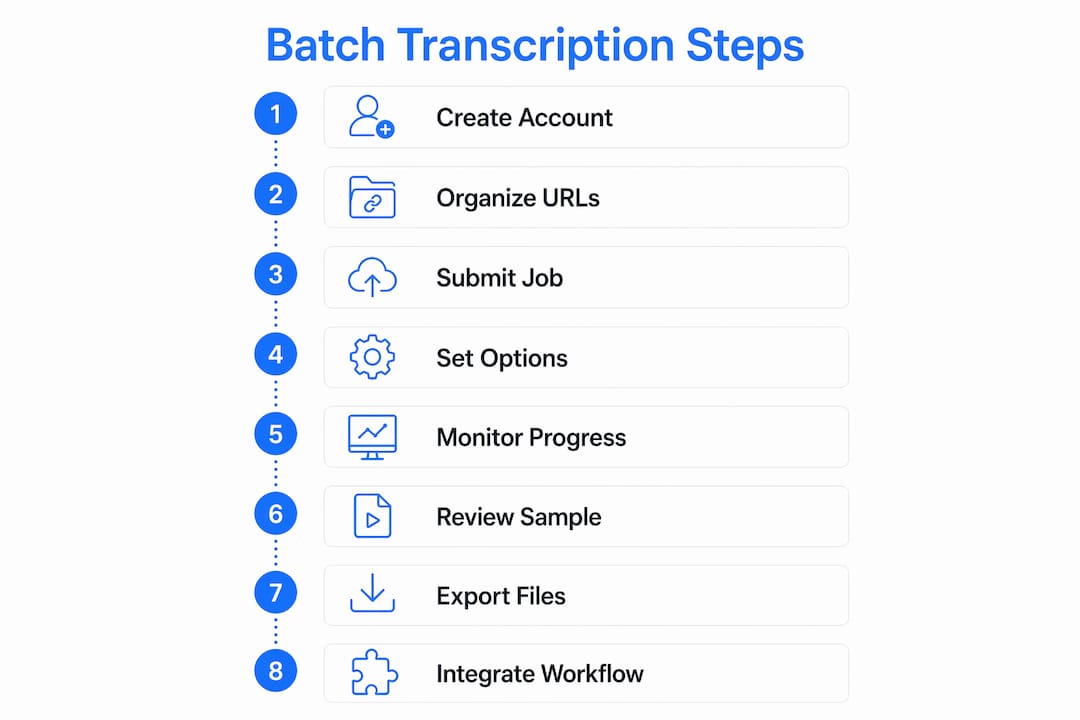
Start by organizing your source material into one of three formats: a list of individual video URLs, a playlist link, or a channel URL. Most tools accept all three, but a playlist link is the cleanest input because it preserves order and lets you filter by date or topic. Collect your URLs in a spreadsheet or plain text file before you open any tool.
Next, apply filtering criteria. If you only need videos from the past year, or only videos longer than ten minutes, set those filters before submitting. YouTubeTranscript.dev supports advanced filters directly in the interface. Speak AI lets you filter by date range when importing a channel. Filtering reduces unnecessary processing and keeps your transcript library organized from the start.
Check audio quality before running large batches. Videos with heavy background noise, multiple overlapping speakers, or low-quality recordings will produce lower accuracy transcripts regardless of which tool you use. A quick manual review of five to ten videos from your library gives you a realistic accuracy baseline.
Pro Tip: For large channel libraries, use a script or the YouTube Data API to pull all video IDs programmatically, then feed that list into your transcription tool. This removes the manual step of copying URLs and scales to thousands of videos without extra effort.
A few additional preparation steps worth noting:
- Confirm that target videos are public. Private or unlisted videos will fail silently in most batch tools.
- Check whether your tool requires an API key or account login before processing begins.
- Decide on your output format before you start. SRT is best for captioning, TXT for AI ingestion, and VTT for web video players.
- Create a dedicated output folder structure organized by channel or playlist to avoid transcript files mixing together.
Step-by-step guide to batch transcribing YouTube videos efficiently
This workflow applies to most AI-powered transcription tools. Adjust the specific interface steps based on your chosen tool.
Step 1: Create your account and configure API access. Sign up for your chosen tool. If you plan to automate the workflow, generate an API key from the settings panel. Tools like Speak AI and TubeScript both provide API documentation for batch job submission.
Step 2: Collect and organize your video URLs. Paste your playlist or channel URL into a text file. If you are working with individual videos, list each URL on a separate line. Keep this file version-controlled so you can rerun jobs without rebuilding the list.
Step 3: Submit the batch job. In the tool interface, paste your playlist URL or upload your URL list. In YouTubeTranscript.dev, this is a single input field. In Speak AI, you use the "Import" panel and select YouTube as the source. Set your language preference and enable timestamps if the tool offers that option.
Step 4: Configure transcription parameters. Select your target language. Enable speaker labels if your videos contain multiple speakers. Choose whether you want AI summaries generated alongside the raw transcript. These settings affect both accuracy and processing time.
Step 5: Monitor the batch job. Short videos transcribe in under a minute; videos up to 30 minutes typically take a few minutes. Most tools display a progress bar or job queue. Do not close the browser tab during processing unless the tool explicitly supports background jobs.
Step 6: Review a sample for accuracy. Before downloading the full batch, open two or three transcripts and check for accuracy on technical terms, proper nouns, and speaker attribution. If accuracy is low, consider switching to a tool with AI audio fallback rather than caption-only processing.
Step 7: Export in your target format. Download transcripts in SRT for captioning, TXT for content repurposing, or JSON for programmatic processing. TXT, SRT, and VTT formats are compatible with all major video platforms and editors.
Step 8: Feed transcripts into your downstream workflow. Import TXT files into a note-taking app like Notion or Obsidian for a searchable knowledge base. Send SRT files to your video editor for caption overlays. Push JSON transcripts into an AI summarization pipeline or a vector database for semantic search.
Pro Tip: Run a small test batch of five videos before committing to a full library job. This catches format issues, API quota limits, and audio quality problems before they affect hundreds of files.
For developers building automated pipelines, connecting transcription tools to YouTube extraction APIs removes the manual URL collection step entirely and lets you trigger end-to-end jobs from a single script.
What are common challenges in bulk YouTube transcription?
Batch transcription at scale surfaces problems that single-video workflows never expose. Knowing them in advance saves hours of debugging.
Videos without captions or with poor audio are the most common failure point. AI audio transcription handles these cases better than caption-based tools, but accuracy still drops with background music, heavy accents, or low bitrate recordings. Flag these videos for manual review rather than accepting low-quality output.
API rate limits become a real constraint when processing libraries of 500 or more videos. Most tools enforce per-minute or per-day quotas. Check your plan's limits before starting a large job and consider spreading the batch across multiple sessions if needed.
Private and region-restricted videos will return errors without explanation in most tools. Build error handling into your workflow so that one failed video does not stop the entire batch. Log failed URLs separately and investigate them manually.
Transcript accuracy on technical content requires post-processing. Medical, legal, and engineering content contains terminology that general AI models misrecognize. Running a find-and-replace pass on common misrecognized terms after export is faster than correcting transcripts one by one.
Relying on YouTube's native auto-captions is insufficient for professional use due to poor speaker differentiation, missing timestamps, and low accuracy on technical vocabulary. AI-powered batch tools consistently outperform native captions for any content that requires precision.
File organization at scale is underestimated. A library of 200 videos produces 200 transcript files. Name files with the video ID and title from the start, and store them in folders that mirror your playlist or channel structure.
How should you repurpose YouTube library transcripts?
Transcripts are the most underused asset in a content creator's workflow. A single batch transcription job unlocks multiple content formats simultaneously.
Export formats like SRT and VTT are the standard for closed captioning on YouTube, Vimeo, and web video players. Uploading SRT files to your YouTube videos improves accessibility compliance and increases watch time because 85% of social media videos are consumed without sound.
For SEO, TXT transcripts feed directly into blog post drafts. A 20-minute tutorial video contains enough material for a 2,000-word article with minimal editing. Tools like Speak AI generate AI summaries alongside the transcript, cutting the editing time further.
Educators can convert transcripts into study guides, quizzes, and course notes. Timestamps let you link directly to specific moments in a video, which is useful for annotated reading lists or flipped classroom materials. The transform-to-posts workflow is one of the highest-ROI applications of batch transcription for content teams.
For AI applications, JSON transcripts with timestamps are ideal inputs for vector databases, retrieval-augmented generation systems, and fine-tuning datasets. Batch transcription tools with API integration let media professionals and educators scale these workflows without manual intervention.
Key repurposing applications by format:
- SRT/VTT: Closed captions, accessibility compliance, video platform uploads
- TXT: Blog drafts, social media posts, email newsletters, AI training data
- JSON: Vector database ingestion, semantic search, AI summarization pipelines
- Timestamped transcripts: Clip generation, highlight reels, annotated course materials
Key takeaways
Batch transcribing YouTube video libraries at scale requires the right tool, organized inputs, and a clear export strategy matched to your downstream use case.
| Point | Details |
|---|---|
| AI accuracy reaches 95% | Modern tools like YouTubeTranscript.dev and Speak AI outperform YouTube's native captions on technical content. |
| Organize inputs before processing | Collect playlist or channel URLs and filter by date or length to avoid wasted batch jobs. |
| Match export format to use case | Use SRT for captioning, TXT for content repurposing, and JSON for AI pipeline ingestion. |
| API access scales the workflow | Tools with developer APIs let you automate end-to-end batch jobs without manual URL collection. |
| Troubleshoot before full runs | Test five videos first to catch rate limits, private video errors, and audio quality issues early. |
Why native captions are not enough for serious workflows
I have watched teams waste weeks building content pipelines on top of YouTube's auto-captions, only to discover the transcripts are unusable for anything requiring precision. Speaker labels are absent. Technical terms are mangled. Timestamps drift. The output looks like a transcript but behaves like noise.
The shift to AI-powered batch tools is not a preference. It is a requirement for any professional workflow. Speak AI's speaker detection alone changes what is possible with interview-heavy content. YouTubeTranscript.dev's channel-level processing means you can transcribe a 300-video archive in an afternoon rather than a week.
The part most guides skip is the infrastructure layer. Transcription tools need clean video files or reliable audio extraction to do their job. When you are working with large YouTube libraries, the extraction step is where most pipelines break. Anti-bot systems, geo-restrictions, and format inconsistencies kill batch jobs before the transcription even starts. That is the problem worth solving first.
I also think the JSON export format is underrated. Most creators default to TXT or SRT because those are familiar. But JSON with timestamps is what makes transcripts useful for AI applications, semantic search, and clip generation at scale. If you are building anything beyond basic captioning, JSON should be your default output.
Start small, test your accuracy on a representative sample, and build the automation layer only after you have confirmed the transcript quality meets your standard. The tools exist to do this well. The failure mode is always rushing the setup.
— Alexandre
Extract YouTube videos at scale before you transcribe
Transcription quality starts with reliable video extraction. Tornadoapi sits between YouTube and your transcription pipeline, handling anti-bot systems, proxy rotation, and format normalization so your batch jobs never fail mid-run. With 300 TB delivered monthly and 99.998% extraction reliability, Tornadoapi gives transcription SaaS platforms, AI labs, and media teams the infrastructure layer their workflows depend on. One API call delivers the file directly to S3, R2, GCS, or Azure. If your batch transcription pipeline needs a reliable extraction layer, the YouTube Downloader API is built for exactly this use case.
FAQ
What does it mean to batch transcribe YouTube video libraries?
Batch transcribing YouTube video libraries means converting multiple videos, entire playlists, or full channels into text transcripts in a single automated job rather than processing each video one at a time.
Which tools support batch YouTube video transcription?
YouTubeTranscript.dev, Speak AI, and TubeScript all support batch processing. They accept playlist or channel URLs and export transcripts in TXT, SRT, VTT, and JSON formats.
How accurate is AI transcription on YouTube videos?
AI-powered tools reach up to 95% accuracy on videos without native captions. Accuracy drops on content with heavy background noise, strong accents, or highly technical vocabulary.
What export format should i use for transcripts?
Use SRT or VTT for closed captioning, TXT for blog drafts and content repurposing, and JSON for AI pipeline ingestion and semantic search applications.
Can i automate batch transcription for large YouTube channels?
Yes. Tools like Speak AI and TubeScript provide developer APIs for batch jobs, letting you submit channel URLs programmatically and receive structured transcript outputs without manual steps.