
How Transcription Platforms Handle Long-Form Video
Transcription platforms handle long-form video by splitting large audio and video files into smaller chunks, processing each segment independently, then stitching the results together with corrected timestamps to produce a single, coherent transcript. This architecture, known as chunked asynchronous transcription, is the production standard for any file exceeding a few minutes. Platforms like OpenAI Whisper and Deepgram have popularized distinct approaches to this problem, and understanding the mechanics behind their pipelines helps content creators, marketers, and media professionals choose the right tool and avoid costly workflow failures.
What technical challenges do transcription platforms face with long-form video?
Transcription platforms hit hard technical walls the moment a file exceeds a few hundred megabytes. The most immediate barrier is file size. OpenAI Whisper enforces a 25 MB upload limit per request, and most competing speech-to-text APIs enforce similar constraints. A typical one-hour interview recorded at broadcast quality runs between 80 MB and 150 MB, which means a naive upload attempt fails before transcription even begins.
Beyond file size, there are three additional failure modes that affect any platform attempting to transcribe long videos synchronously:
- HTTP timeout errors. Synchronous API calls hold an open connection while the server processes audio. For a two-hour file, that processing window can stretch to minutes or longer, and most web infrastructure closes idle connections well before the job completes.
- Memory exhaustion. Speech recognition models load audio into memory for inference. Scaling that memory linearly with file length is not sustainable for multi-hour content.
- Context window limits. Even if a model could process the full file, its attention window has a ceiling. Feeding an entire two-hour recording into a single model pass degrades accuracy in the second half because the model loses context from the first.
The result is that sending entire long files triggers HTTP 413 errors or silent timeouts, producing no transcript at all. This is not an edge case. It is the default outcome for any pipeline that skips chunking.
Pro Tip: Before selecting a video transcription service, test it with a 45-minute file at your typical bitrate. If the platform returns a timeout or size error without a clear chunking fallback, it is not production-ready for long-form content.
How does chunking and stitching enable efficient transcription of long videos?
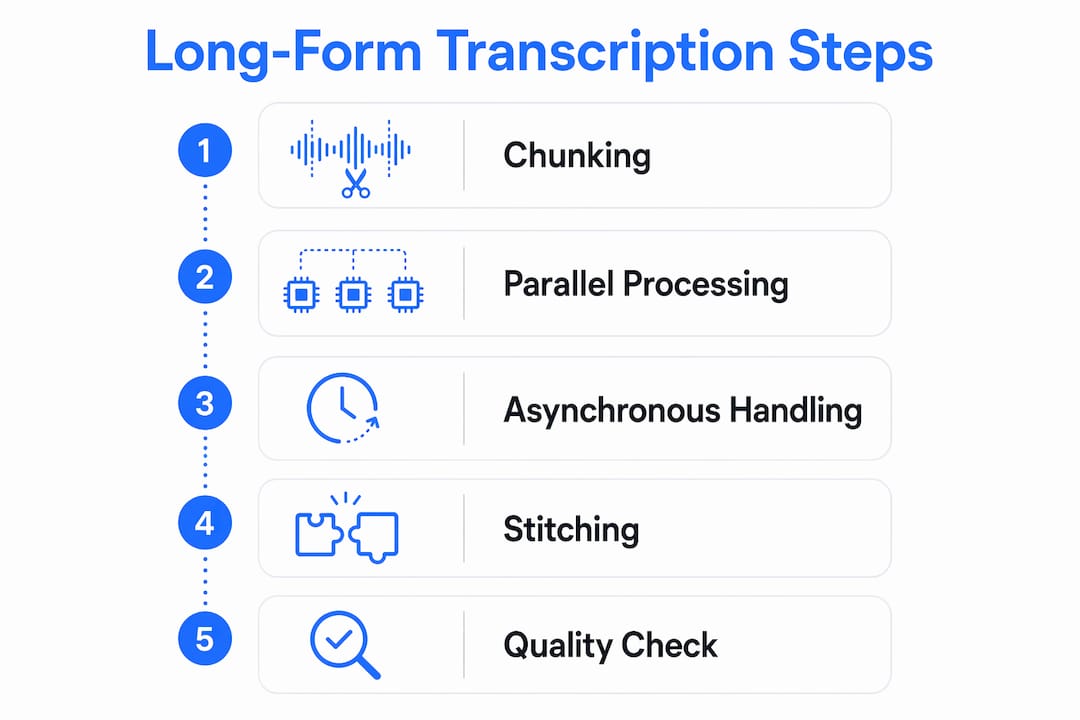
Chunking solves the size and timeout problem by breaking a long audio or video file into segments short enough for any API to accept. The stitching step reassembles those segments into a single transcript with accurate global timestamps. Getting both steps right is what separates a professional transcription pipeline from a fragile prototype.
A standard chunking workflow using ffmpeg looks like this:
- Extract audio from video. Convert the source file to mono audio at 32 kbps or 64 kbps. Adaptive compression at 64 kbps mono reduces file size dramatically while preserving speech intelligibility.
- Split into fixed-length segments. Ten to twenty minute segments are the practical sweet spot. Shorter segments increase API call overhead; longer segments risk hitting size limits again.
- Reset timestamps to zero for each chunk. Every segment is treated as an independent file. The transcription engine returns timestamps relative to the chunk's own start, not the original video's timeline.
- Transcribe chunks in parallel. Running segments concurrently rather than sequentially cuts turnaround time significantly. Parallel transcription of chunks reduces total processing to roughly 8 to 12 minutes for a two-hour recording, which is a fraction of real-time.
- Stitch with global time offsets. During reassembly, each word-level timestamp is adjusted by adding the chunk's start offset in the original timeline. The formula is straightforward: "global_start = seg.start + timeOffsetSec`. Applying this offset rule prevents duplicate words and missing segments at chunk boundaries.
The most common stitching bug is a boundary word getting cut in half. A speaker's sentence ends mid-word exactly where one chunk stops and the next begins. The fix is overlap handling.
Pro Tip: Add a 2 to 3 second overlap between adjacent chunks. Chunk overlaps of 2 to 3 seconds capture boundary words in both segments. During stitching, strip the duplicate text from the overlap region before merging. This one step eliminates the majority of transcript errors at segment boundaries.

Here is how silence-aware splitting compares to fixed-interval splitting:
| Splitting method | Boundary accuracy | Risk of cut words | Processing complexity |
|---|---|---|---|
| Fixed interval (every N seconds) | Moderate | High at speech boundaries | Low |
| Silence-aware splitting | High | Low | Medium |
| Silence-aware with overlap | Very high | Very low | Medium |
Silence-aware splitting detects natural pauses in speech and places cuts there, which means the model never has to reconstruct a word that was split mid-phoneme. Combined with overlap handling, it produces the cleanest possible input for each transcription call.
What role do asynchronous workflows and event-driven completion play?
Asynchronous transcription is not a convenience feature. For long-form video, it is the only architecture that works reliably at scale. The core principle is simple: the platform accepts a job, returns a job ID immediately, and notifies your system when the transcript is ready. Your application does not wait.
The notification mechanism that makes this work is the webhook. Transcription completion events like transcription.processed signal that the transcript is available, and your system should treat this event as the definitive trigger for downstream processing, not the moment recording stops. The gap between those two events can be minutes or hours for long recordings.
Production pipelines that rely on webhooks alone are fragile. Webhooks can arrive out of order, be delayed by network issues, or fail silently if your endpoint is temporarily unavailable. The standard solution combines two mechanisms:
- Webhooks for normal completion. Your endpoint receives the
transcription.processedevent and immediately fetches the transcript. This covers the vast majority of jobs. - Background polling as a fallback. A scheduled job checks the status of any transcription that has not returned a webhook within the expected window. Production pipelines combine webhooks with polling to reconcile missed or delayed events without manual intervention.
This dual approach also has a downstream benefit that most teams overlook. A two-hour transcript can exceed 15,000 to 25,000 words, which pushes past the context limits of most language models used for summarization or search indexing. Asynchronous delivery gives your pipeline time to chunk the transcript itself before feeding it to an NLP model, rather than attempting to process the full text in a single pass.
For content creators building searchable video libraries, maintaining a segment list with video ID, start and end times, and text per chunk throughout the pipeline enhances jump-to-timestamp features and powers retrieval-augmented search across large catalogs.
How do multi-engine pipelines improve accuracy and timing?
Single-engine transcription forces a tradeoff. Whisper produces highly accurate text with strong contextual understanding of technical vocabulary, domain-specific terminology, and accented speech. Deepgram returns faster results with more precise word-level timestamps. No single engine excels at both simultaneously.
The solution used by advanced automated video transcription systems is to run both engines in parallel and merge their outputs. A dual-engine system combining Whisper and Deepgram uses confidence-weighted alignment to select the best output for each word or phrase. The result is a transcript that inherits Whisper's accuracy and Deepgram's timing precision.
The practical outcome of this architecture is sub-100ms word-level timestamp accuracy, which is the threshold that makes automated clip generation reliable. If your timestamps are off by more than 100ms, auto-generated clips start or end mid-word, and the resulting captions look broken to viewers.
| Engine | Strength | Weakness |
|---|---|---|
| OpenAI Whisper | Contextual accuracy, domain vocabulary | Timestamp precision |
| Deepgram | Fast, precise word-level timestamps | Context sensitivity on complex speech |
| Merged dual-engine output | Both accuracy and timing | Higher infrastructure cost |
For media professionals producing highlight reels, podcast clips, or searchable video archives, the merged approach is worth the added complexity. Using two engines in parallel exploits each engine's strengths in a way that neither can achieve alone. You can learn more about architectures that combine these engines in the Whisper transcription API guide published by Tornadoapi.
What should content creators look for in transcription platforms for long videos?
Choosing among the best transcription platforms for long-form content requires evaluating more than price per minute. The technical architecture of the platform determines whether it will hold up under real production conditions.
- Adaptive compression and silence-aware splitting. Platforms that compress audio intelligently before chunking reduce API costs and improve boundary accuracy. Look for explicit documentation of how the platform handles files over 500 MB.
- Parallel chunk processing. Sequential transcription of a two-hour video takes far longer than necessary. Confirm that the platform processes chunks concurrently.
- Asynchronous event support. Any platform that requires you to poll a status endpoint as the only completion mechanism is not built for scale. Webhook support is non-negotiable for production workflows.
- Word-level timestamps and speaker diarization. Long-form video captions are only useful if timestamps are accurate enough to drive clip generation and search. Speaker diarization, which labels who said what, is critical for interview and panel content.
- Turnaround time guarantees. A platform that processes a two-hour file in 10 minutes is meaningfully different from one that takes 45 minutes. Ask for production benchmarks, not marketing estimates.
Pro Tip: When evaluating video transcription services, request a sample transcript from a 90-minute file that includes multiple speakers, background noise, and technical vocabulary. The quality of that output tells you more than any feature checklist.
How you source the video before transcription also matters. Platforms that pull directly from YouTube, Spotify, or TikTok without requiring you to download and re-upload files save significant time. Tornadoapi covers this workflow in detail in its guide on how transcription SaaS sources video.
Key takeaways
Transcription platforms handle long-form video through chunked parallel processing, asynchronous event-driven delivery, and multi-engine merging to produce accurate, timestamped transcripts at scale.
| Point | Details |
|---|---|
| Chunking is mandatory | Files over 25 MB will fail without a chunking pipeline; split into 10 to 20 minute segments. |
| Stitching requires offset math | Add each chunk's start time to segment timestamps to prevent duplicates and missing words. |
| Webhooks beat polling | Use transcription.processed events as the completion trigger, with polling as a fallback only. |
| Dual-engine merging wins on accuracy | Combining Whisper and Deepgram achieves sub-100ms timestamp precision, enabling reliable clip generation. |
| Silence-aware splits reduce errors | Cutting at natural pauses rather than fixed intervals eliminates most boundary word errors. |
Why most transcription failures I see are stitching problems, not engine problems
After working with transcription pipelines across dozens of content workflows, the pattern I keep seeing is this: teams spend weeks evaluating Whisper versus Deepgram versus AssemblyAI, then ship a pipeline that breaks on any file over 30 minutes because the stitching logic was an afterthought.
The engine choice matters less than most people think. The difference in raw accuracy between top-tier engines on clean audio is marginal. What destroys transcript quality is bad offset math, missing overlap handling, or a stitching step that concatenates raw text without reconciling timestamps. I have reviewed transcripts from "enterprise" platforms that had 30-second gaps in the middle of a two-hour recording because a single chunk failed silently and the pipeline moved on without it.
The other underrated issue is treating the recording-stopped event as the signal to fetch a transcript. That assumption works for five-minute clips. For a two-hour webinar, the transcript may not be ready for another 20 minutes after recording ends. Pipelines that do not account for this delay either return empty results or force users to manually retry, which is a workflow failure regardless of how good the underlying engine is.
The teams that get this right maintain a segment manifest throughout the pipeline, track chunk status individually, and use event-driven completion with a polling safety net. That architecture handles failures gracefully, scales to any file length, and produces transcripts accurate enough to power search, captions, and automated clip generation. The engine is a commodity. The pipeline is the product.
— Alexandre
How Tornadoapi powers long-form transcription workflows at scale
Tornadoapi sits between YouTube, Spotify, Instagram, TikTok, and your transcription pipeline. One API call delivers the extracted audio or video file directly to your cloud storage (S3, R2, GCS, or Azure), with anti-bot handling and format normalization already resolved. That means your chunking and transcription pipeline receives a clean, ready-to-process file without any manual download step.
For teams running asynchronous transcription at scale, Tornadoapi's direct cloud export API integrates with event-driven architectures natively, delivering files straight to the storage bucket your transcription workers are already watching. With 300 TB delivered monthly and 99.998% extraction reliability, it is the extraction layer that production transcription SaaS and AI labs rely on. Review the available plans to find the tier that fits your volume.
FAQ
What is the file size limit for transcribing long videos?
Most major speech-to-text APIs, including OpenAI Whisper, enforce a 25 MB per-file limit. A one-hour interview at standard quality typically runs 80 to 150 MB, which requires chunking before any transcription can begin.
How do transcription platforms keep timestamps accurate across chunks?
Each chunk is transcribed with timestamps relative to its own start. During stitching, platforms add the chunk's global start offset to every segment timestamp using the formula global_start = seg.start + timeOffsetSec, which preserves correct timing across the full transcript.
What is the difference between webhooks and polling for transcription completion?
Webhooks push a notification to your endpoint the moment a transcript is ready, while polling requires your system to repeatedly check a status endpoint. Production pipelines use webhooks as the primary signal and polling as a fallback for missed or delayed events.
Why use two transcription engines instead of one?
Whisper delivers strong contextual accuracy while Deepgram provides faster, more precise word-level timestamps. Merging both outputs through confidence-weighted alignment produces sub-100ms timestamp accuracy that neither engine achieves alone.
How long does it take to transcribe a two-hour video?
With parallel chunk processing and adaptive compression, a two-hour recording typically completes transcription in 8 to 12 minutes. Sequential processing of the same file takes significantly longer and is not suitable for production workflows.