
How AI Video Repurposing Works for Creators in 2026
Most content creators assume AI video repurposing means clipping a long video into shorter pieces and reposting them everywhere. That assumption costs you reach, engagement, and hours of wasted effort. Understanding how AI video repurposing works requires a different mental model entirely. The AI video editing process is not about duplication. It is about structural transformation. AI adoption for video creation jumped from 18% to 41% among professionals in a single year, and the creators gaining the most from it are the ones who understand what the technology actually does under the hood.
Table of Contents
- Key Takeaways
- How AI video repurposing works at the technical level
- The reshaping process: how AI adapts content for each platform
- Real benefits of AI-powered repurposing workflows
- Balancing AI automation with human editorial control
- My honest take on AI video repurposing
- How Tornadoapi powers your repurposing pipeline
- FAQ
Key Takeaways
| Point | Details |
|---|---|
| AI reshapes, not reposts | AI changes content structure and flow to fit each platform's native consumption habits. |
| Transcription drives everything | Speech-to-text is the foundation that lets AI identify which moments are worth extracting. |
| Time savings are measurable | A 30-minute video can yield 15-25 assets in about 50 minutes total with AI assistance. |
| Human oversight is non-negotiable | AI handles 60-70% of the workload; humans must control narrative quality and brand alignment. |
| Infrastructure determines scale | Reliable video extraction at the ingestion layer is what separates hobby workflows from production pipelines. |
How AI video repurposing works at the technical level
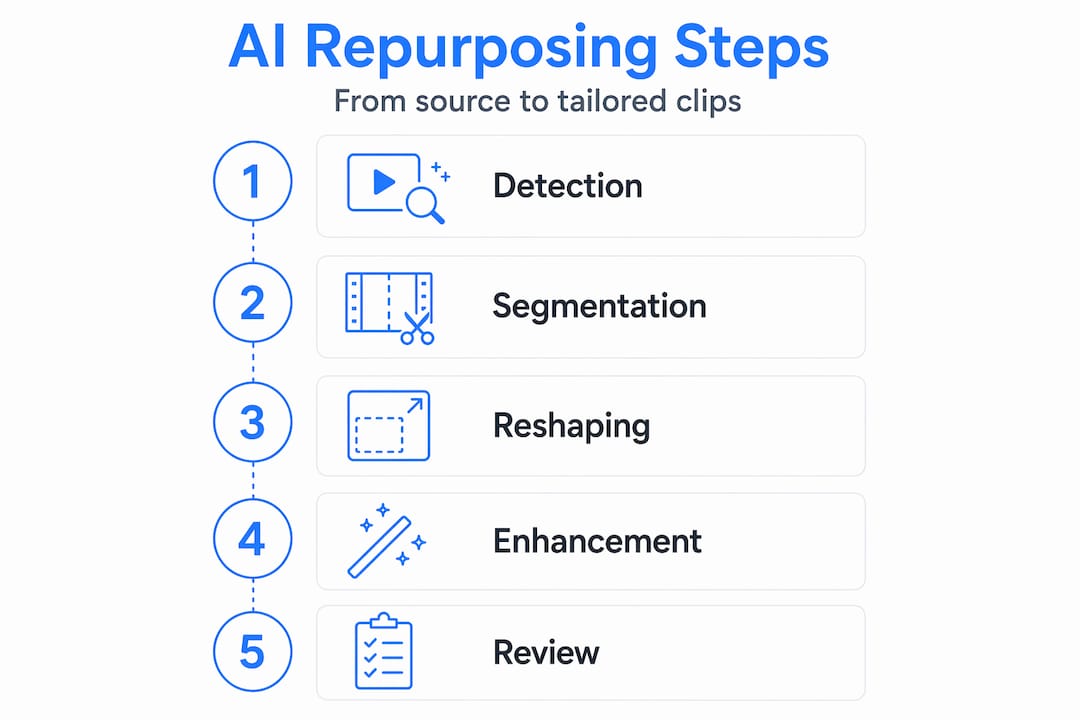
Before any clip gets created, the AI needs to understand what is in your video. This happens through a layered detection process that most tutorials skip entirely.
The first step is speech-to-text transcription. The AI converts your audio into a structured text document, which becomes the backbone for every downstream decision. Without accurate transcription, the system is effectively blind. It cannot know whether a given 45-second stretch contains your sharpest insight or a rambling tangent.
Once the transcript exists, the AI scans for engagement signals:
- Semantic density: Sections where multiple high-value concepts cluster together in short windows
- Vocal pattern shifts: Changes in speaking pace or pitch that often signal emphasis or storytelling peaks
- Keyword frequency: Topics that recur across the video, suggesting importance to the source narrative
- Audience retention proxies: For platforms that provide analytics data, historical drop-off points inform which sections to avoid
After detection, the AI segments the video into labeled chunks. Think of it like a table of contents being generated automatically. Each chunk gets a relevance score based on the signals above, and the highest-scoring segments become candidates for derivative assets.
Pro Tip: Feed your AI repurposing tool the cleanest audio file you can produce. Background noise and overlapping speech degrade transcription accuracy, and every transcription error compounds into poor segment selection downstream.
Platforms like Descript, OpusClip, and Vidyo.ai automate much of this process. But what they do at the interface level sits on top of the same technical foundation: transcript-driven segmentation followed by relevance scoring. Understanding structured content extraction helps you design source videos that AI can parse more effectively, which directly improves output quality.
The reshaping process: how AI adapts content for each platform
Repurposing and reuploading are not the same thing. AI reshapes content by adjusting structure and flow rather than just trimming edges. This distinction is what determines whether your repurposed content performs or gets ignored.
Here is a practical comparison of what reposting looks like versus genuine AI-driven reshaping:
| Approach | What happens | Platform result |
|---|---|---|
| Simple reupload | Same video, shorter runtime | Feels out of context, low retention |
| Basic trimming | Manual cuts with no structural change | Better length, still missing native feel |
| AI reshaping | New pacing, captions, reordered narrative flow | Feels native to platform, higher engagement |
| Full AI pipeline | Platform-specific aspect ratio, audio normalization, auto-captions, B-roll inserts | Indistinguishable from natively created content |
The reshaping process involves several concrete transformations. Duration adjustment is obvious, but pacing is where AI adds real value. A 45-minute podcast episode has a conversational rhythm that works for audio-first listeners. When that same content moves to TikTok, the AI must compress that rhythm. It does this by removing filler phrases, trimming pause gaps below a threshold, and sometimes reordering statements so the payoff arrives in the first three seconds rather than the third minute.

Visual and audio enhancements follow. Auto-generated captions are now table stakes. More sophisticated workflows add dynamic text overlays, highlight b-roll insertions, and audio normalization to bring inconsistent recording levels into a consistent range. Platform-specific optimization means more than aspect ratio changes. Instagram Reels rewards fast cuts and text on screen early. YouTube Shorts favors vertical framing with a strong spoken hook. TikTok penalizes obvious reposts, so platform-native content with unique visual elements consistently outperforms recycled clips.
Pro Tip: When using AI for content creation across multiple platforms, build your source video with repurposing in mind. Structure your recording as a series of standalone points rather than one continuous argument. The AI will have cleaner segments to work with, and each clip will stand on its own.
Real benefits of AI-powered repurposing workflows
The efficiency gains here are concrete, not theoretical. AI-powered workflows reduce per-asset production costs by 60-70%, bringing costs down from the $150-$300 range to $40-$80 per piece. For a marketing team producing 20 assets per week, that math changes budget conversations entirely.
Time savings are equally significant. A standard repurposing workflow for a 30-minute video requires about 50 minutes total to generate 15-25 derivative assets. That includes recording time and editorial review. A human editor working manually on the same project would need three to five hours and produce a fraction of the output.
The strategic benefits go beyond cost and time:
- Higher content frequency: More assets from each source video means consistent posting without proportionally more recording sessions
- Platform-native engagement: Content shaped for each channel outperforms reposts because it matches the consumption behavior of that audience
- Reduced creator burnout: AI handles repetitive cutting and formatting tasks, freeing creators to focus on performance and ideation
- Compounding library value: Every hour of source video becomes a reusable asset catalog that AI can mine again as platform trends shift
AI empowers content strategists to generate more assets per source video, which unlocks engagement opportunities that a manually constrained workflow simply cannot reach. For marketers running multi-platform campaigns, the ability to deploy 20 platform-specific assets from one interview recording changes what a single content day can accomplish.
Balancing AI automation with human editorial control
AI tools increase production speed dramatically, but the workflows that actually produce quality output build in deliberate human checkpoints. The most effective ratio applies AI to 60-70% of the workload and keeps humans responsible for the final 30-40% covering narrative integrity and brand alignment.
In practice, this means defining quality gates at specific moments in your workflow rather than reviewing everything at the end. Effective checkpoints include:
- Transcript accuracy review: Catch misheard words before they cascade into bad segment selection or incorrect auto-captions
- Narrative structure check: Verify that AI-selected clips tell a coherent story rather than stringing together disconnected highlights
- Brand voice scan: Confirm tone, terminology, and messaging match your positioning before publishing
- Platform fit assessment: Manually watch each repurposed clip at native speed to check pacing and visual flow
One issue that catches creators off guard is YouTube's reused content detection. Unique AI-generated B-roll creates distinct visual hashes that prevent monetization flags when you publish the same underlying content across multiple YouTube uploads.
Content density is another limit to respect. Forcing too much content into repurposed formats degrades quality. A 2,000-word article can produce either one solid long-form video or four strong short clips, but not both at the same time. Treating your source material as infinitely elastic is how you end up with mediocre content across the board.
Pro Tip: Define your quality gates before you run the AI workflow, not after. If your review step only happens at the end, you are reviewing finished assets instead of catching problems when they are cheap to fix.
Logic-gated quality control with manual review stages for transcript accuracy and narrative structure is what separates professional repurposing pipelines from automated content farms that produce high volume but low engagement.
My honest take on AI video repurposing
I've watched creators burn through AI tools in the first month and declare the technology overhyped. Almost every time, the problem wasn't the tool. It was the expectation that AI would make editorial decisions on their behalf.
In my experience, the workflows that actually deliver results treat AI as a fast, tireless production assistant, not a creative director. I've seen teams cut asset production time by more than half simply by restructuring how they recorded source content, making it easier for the AI segmentation layer to find clean, standalone moments. The technology didn't change. The input did.
What I've learned from watching dozens of these integrations is that the human contribution becomes more strategic over time, not less. You spend less time on mechanical cuts and more time deciding what story each platform's audience actually needs to hear. That is a better use of creative judgment than manually trimming silence from a podcast recording.
The creators who get the most out of using AI for content creation are the ones who stay involved at the narrative level. They let AI handle the repetitive editing tasks while they focus on emotional tone, pacing decisions, and the question of whether a given clip actually serves the audience on that specific channel. That is a partnership worth building.
— Alexandre
How Tornadoapi powers your repurposing pipeline
If you are building or scaling an AI video repurposing tool, the ingestion layer is where most teams hit their first hard ceiling. Extracting video reliably from YouTube, TikTok, Instagram, and Spotify at production volumes requires anti-bot handling, format normalization, and direct cloud delivery that most scraping toolboxes cannot sustain at SLA-grade reliability.
Tornadoapi sits between the source platforms and your processing pipeline. One API call ships the file directly to your S3, R2, GCS, or Azure bucket. With bulk video extraction handling 300 TB per month at 99.998% reliability, Tornadoapi gives repurposing platforms and AI labs a foundation they can build on without managing proxy infrastructure themselves. Check the production-scale pricing tiers to find the right fit for your extraction volume.
FAQ
What does AI actually do during video repurposing?
AI transcribes the audio, scores segments by relevance, then reshapes selected clips with format-specific edits like captions, pacing adjustments, and aspect ratio changes. The goal is platform-native content, not just shorter versions of the original.
How much time does AI video repurposing save?
A 30-minute source video takes roughly 50 minutes total to produce 15-25 derivative assets with AI assistance, compared to three to five hours using manual editing for far fewer outputs.
Can AI fully replace human editors in repurposing workflows?
No. AI handles 60-70% of the production workload effectively, but human editors are still responsible for narrative structure, brand voice, emotional tone, and final quality checks that AI cannot reliably replicate.
How do you avoid YouTube reused content penalties?
Adding unique AI-generated B-roll to each repurposed video creates a distinct visual hash that differentiates it from the source upload, which prevents YouTube's reused content detection from flagging your content or blocking monetization.
What is the biggest mistake in AI video repurposing?
Treating source video as infinitely reusable. A single piece of content has a natural density limit. Trying to extract too many assets from it produces low-quality outputs across every platform rather than strong, focused content on a few.