
How to ingest YouTube videos at scale
If you are manually downloading, tagging, and uploading YouTube content one video at a time, you are not running a pipeline — you are running a liability. Teams that need to ingest YouTube videos at scale run into three problems almost immediately: quota exhaustion, metadata bottlenecks, and no reliable way to recover from failures. This guide covers exactly how to fix those problems, from infrastructure setup through pipeline automation, with the kind of specifics that actually matter when you are operating at hundreds of terabytes per month, not hundreds of megabytes.
Table of Contents
- Understanding the challenges of ingesting YouTube videos at scale
- Preparing your infrastructure and tools for scalable ingestion
- Building the automated pipeline: from metadata to video upload
- Verifying pipeline performance and managing common pitfalls
- Rethinking video ingestion: lessons and unexpected insights
- Streamline your YouTube ingestion with TornadoAPI
- Frequently asked questions
Key Takeaways
| Point | Details |
|---|---|
| Manual workflows waste resources | Manual YouTube ingestion and upload cause high time and cost overheads that automation can drastically cut. |
| Cache API requests aggressively | Caching up to 92% of metadata requests avoids quota exhaustion and lowers operational costs. |
| Decouple processing stages | Separating metadata and transcription from video upload improves pipeline speed and resilience. |
| Use chunked uploads and scheduling | Chunked, resumable uploads and API-based scheduling are key to reliable, scalable ingestion. |
| Monitor and alert on quota use | Real-time quota tracking and alerts prevent outages and ensure steady ingestion at scale. |
Understanding the challenges of ingesting YouTube videos at scale
Most teams underestimate what "video ingestion" actually involves. It is not just downloading a file. Video content ingestion is more complex than text or images, requiring automation and metadata intelligence to avoid bottlenecks. You are dealing with multiple renditions (360p through 4K), format variants (VP9, AV1, H.264), thumbnail assets, captions, and chapter metadata — all of which need to be extracted, normalized, and stored consistently.
The operational surface area compounds quickly:
- File sizes range from a few megabytes for short clips to 50+ GB for uncompressed 4K content
- Metadata schemas differ depending on whether you are pulling transcripts, auto-generated captions, or structured chapters
- Rate limits at the YouTube Data API layer hit you long before storage or bandwidth does
- Format normalization is required when feeding video into transcription, frame extraction, or LLM pipelines
- Retry logic must handle intermittent geo-blocks, anti-bot challenges, and CDN throttling without silently corrupting your queue
Manual workflows fail the moment library size exceeds a few hundred videos or upload frequency moves from weekly to daily. Teams running YouTube extraction APIs at production scale know that automation is not an optimization, it is a prerequisite. Good video SEO insights can help you understand what metadata structures matter most, which directly informs how your ingestion schema should be designed from the start.
Preparing your infrastructure and tools for scalable ingestion
Before you write a single line of pipeline code, you need to understand your quota ceiling. The YouTube Data API v3 gives you 10,000 units per day by default. A single "videos.listcall costs 1 unit; asearch.list` call costs 100 units. If you are not batching and caching aggressively, you will burn through your quota in hours.
Quota and caching strategy
Caching up to 92% of API requests in Redis significantly lowers quota use and costs. The pattern is straightforward: hash your request parameters, check Redis first, write through on a miss, and set a TTL that matches the staleness tolerance of your use case (usually 24 to 48 hours for video metadata).
The following table shows how key infrastructure choices affect cost and throughput:
| Component | Low-scale setup | High-scale setup |
|---|---|---|
| API quota management | Manual tracking | Automated quota monitor with alerts |
| Caching layer | None | Redis with TTL-based invalidation |
| Job scheduling | Cron jobs | Orchestration via n8n or Airflow |
| Error handling | Logs only | Dead letter queues with retry jitter |
| Delivery target | Local disk | Direct cloud delivery (S3, GCS, R2) |
Tooling checklist before you start building
- Redis or Memcached for caching API responses and deduplicating requests
- A message queue (RabbitMQ, SQS) to buffer ingestion jobs and absorb traffic spikes
- An orchestration layer — follow our automation workflow guide to set up n8n with YouTube ingestion nodes
- Object storage with versioning enabled for raw video files and processed outputs
- A secrets manager (Vault, AWS Secrets Manager) for rotating API credentials safely
For teams doing batch downloads, grouping metadata requests by channel or playlist before fetching reduces round trips significantly. The automation workflow best practices apply directly here: structure your triggers, validate inputs early, and fail loudly rather than silently skipping videos.
Pro Tip: Do not mix your metadata fetch layer with your video download layer. Keep them as separate services with separate queues. Metadata is cheap and fast; video download is slow and bandwidth-heavy. Coupling them means a slow download stalls your metadata pipeline.
Building the automated pipeline: from metadata to video upload
With infrastructure in place, here is how to build the pipeline end to end.
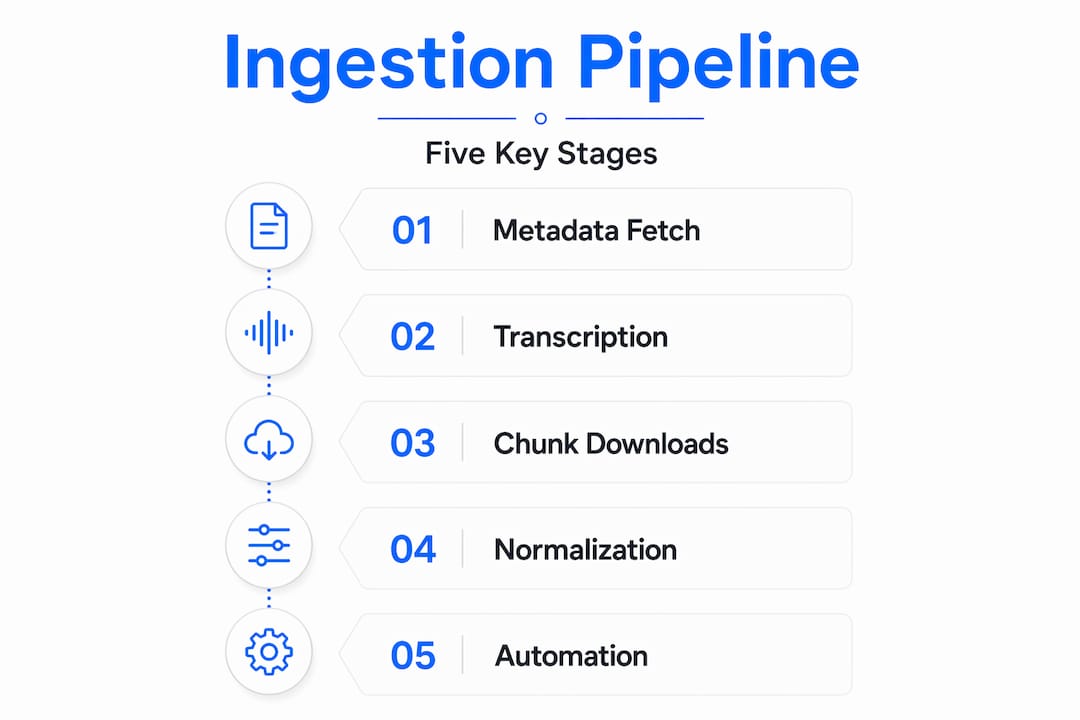
Step 1: Metadata extraction and enrichment
Pull video metadata (title, description, tags, duration, transcript) using batched API calls. Then run topic modeling or a lightweight LLM prompt over the raw description to generate structured categories, keyword clusters, and search-intent labels. This happens before any video file is touched. Automated pipelines reduce upload time for 10-minute videos from 12 minutes down to 2 minutes by decoupling metadata and video processing — so get this stage right.
Step 2: Transcript generation
Rather than paying per-minute to a third-party transcription API, run Whisper (large-v3 or turbo) on your own GPU. At scale, this cuts per-video cost from $4.50 to $0.18, and you get the transcript data in a schema you control. Store transcripts as structured JSON with speaker diarization flags if your use case involves podcast or interview content.

Step 3: Chunked video download
Never download large video files in a single stream. Implement chunked, resumable downloads using range requests. YouTube's engineering uses chunked uploads and parallel processing to scale reliably, and your ingestion infrastructure should apply the same principles. A failed download at byte 3.8 GB should resume from that byte offset, not restart from zero.
Step 4: Format normalization
After download, normalize to your target codec and container before storage. For LLM pipelines, this typically means extracting audio (WAV or FLAC) and key frames separately. For transcription SaaS products, normalized MP4 at a fixed bitrate is usually the right output. Use FFmpeg in a containerized worker for this.
Step 5: Scheduling and release automation
If your workflow involves republishing or scheduling processed content, use the bulk YouTube video extraction API to pull scheduling metadata and batch-set publish times programmatically. YouTube Studio's native interface caps you at 15 videos per session and requires manual date entry for each one. API-driven scheduling removes that ceiling entirely.
| Approach | Time per video | Error recovery | Scalability |
|---|---|---|---|
| Manual upload via Studio | 12+ minutes | Manual retry | Not viable above 50 videos/day |
| Scripted API upload | 3 to 4 minutes | Basic retry | Moderate (up to ~200 videos/day) |
| Fully automated pipeline | Under 2 minutes | Retry with jitter + dead letter queue | Handles thousands per day |
Pro Tip: Use exponential backoff with random jitter on every network call in your pipeline. Without jitter, a fleet of workers recovering from a failure will all retry at the same second, causing a thundering herd that triggers rate limits and makes the outage worse.
Verifying pipeline performance and managing common pitfalls
A pipeline you cannot observe is a pipeline you cannot trust. Here is what to instrument from day one.
Monitoring setup
Run Prometheus exporters on your worker nodes and pipe metrics into Grafana. The dashboards you care about: videos ingested per hour, API quota consumed vs. remaining, download failure rate, queue depth, and p95 download latency. These four metrics will surface 90% of your operational problems before they become incidents.
Alerting
Set PagerDuty or Slack alerts on:
- Quota usage crossing 70% of daily limit before noon
- Queue depth exceeding 500 jobs (indicates a worker bottleneck)
- Download failure rate above 2% in any 15-minute window
- Dead letter queue receiving more than 10 messages per hour
The most expensive pipeline failures are silent ones. Robust quota tracking and retry logic prevent outages seen in teams that wasted hundreds of thousands on quota overages. Silence in your logs does not mean success — it often means your error handling is swallowing exceptions.
Common mistakes and how to avoid them
Review the YouTube downloader APIs comparison to understand which extraction strategies carry the highest risk of quota burn or anti-bot detection. The most common mistakes we see:
- Overusing
search.listin hot paths (100 units each) whenvideos.listor a cached result would work - No cache persistence across restarts — Redis data lost on pod restart means cold quota burn on every deployment
- Missing retry jitter causing synchronized retry storms after transient failures
- Ignoring frame deduplication when preparing video data for LLM analysis — sending near-identical frames wastes context window tokens and increases inference cost
For LLM pipelines specifically, use content-based hashing (perceptual hash or SSIM threshold) to deduplicate frames before packaging them as model inputs. A 10-minute video at 1 fps generates 600 frames; with 80% similarity-based deduplication, you might send 120 unique frames instead, cutting token usage by the same ratio.
Rethinking video ingestion: lessons and unexpected insights
Here is something most engineering posts do not say directly: the biggest cost in video ingestion pipelines is not storage or compute. It is the engineering time spent managing fragile quota logic and one-off failure cases that compound over months.
Teams consistently underestimate quota cost because they prototype against a small dataset where quota never runs out, then hit production and find that a single poorly written batch job can burn 48 hours of quota in 20 minutes. Handling quota management rigorously and decoupling processing stages are key to preventing costly failures and downtime — but most teams only internalize this after their first major incident.
The other pattern worth examining: many teams treat transcription and metadata generation as post-processing steps. They should be pre-processing steps. If your transcription job fails after a 4 GB download completes, you have wasted bandwidth and compute. Run metadata and transcription validation on a small sample segment before committing to a full download. This is especially important when mass ingesting videos for dataset creation, where a bad batch discovered late costs you days of reprocessing.
Operational AI, including automated transcription and metadata, is the future for scalable video content workflows — but "automated" does not mean "unmonitored." The teams running this well are the ones who treat their ingestion infrastructure the way they treat production application code: with CI/CD, integration tests, and on-call rotations.
Finally, design your pipeline around codec agnosticism from day one. AV1 is gaining ground on YouTube. If your normalization layer hardcodes H.264 assumptions, every format shift becomes a migration project. Use the YouTube extraction APIs that return format manifests, not just direct file URLs, so your pipeline can make format decisions at runtime.
Streamline your YouTube ingestion with TornadoAPI
If you have gotten this far, you know that efficient video ingestion at production scale is an infrastructure problem as much as it is an engineering problem. Anti-bot handling, proxy rotation, format normalization, and direct cloud delivery (S3, R2, GCS, Azure) need to work reliably every time — not just most of the time.
TornadoAPI is purpose-built for this exact workload. One API call, and we ship the file to your cloud bucket — 300 TB delivered per month, 99.998% extraction reliability in production, 50 Gbps capacity. Teams replacing managed scraping toolboxes come to us for one reason: a contractual SLA on reliability, not a self-managed toolbox. Check TornadoAPI pricing to find the plan that fits your volume, or explore our video clipping and delivery API if your use case involves downstream content processing. Book a 30-minute infra-to-infra call at cal.com/velys/30min to talk through your pipeline directly.
Frequently asked questions
What is the best way to avoid YouTube API quota exhaustion when ingesting videos at scale?
Implement aggressive caching strategies, batch API requests, and monitor quota usage in real time to prevent unexpected overages. Caching up to 92% of API requests reduces quota consumption and costs significantly.
How can I automate video transcription to reduce ingestion costs?
Use self-hosted transcription tools like Whisper to generate accurate transcripts locally at a fraction of third-party service costs. Self-hosted transcription with Whisper large-v3 cuts per-video cost from $4.50 to $0.18.
Can I upload multiple videos to YouTube simultaneously through their native interface?
YouTube Studio supports uploading up to 15 videos at once but lacks bulk scheduling, requiring manual publish date setting for each video. Native bulk upload is limited to 15 files per session without bulk scheduling.
Why is decoupling metadata generation from video processing important?
It allows parallel processing, reduces bottlenecks, and speeds up the upload pipeline, enabling more efficient and scalable workflows. YouTube's own engineering success relies on decoupling upload from processing and using chunked uploads.
How do I optimize video frames for analysis by large language models?
Use content-based frame deduplication with similarity thresholds instead of fixed frame rates to minimize redundant processing and token usage. Frame deduplication based on similarity is critical to optimize LLM context windows and reduce latency.